[H]ard|Forum

Go Back   [H]ard|Forum > [H]ard|Ware > Displays

Reply
 
Thread Tools Search this Thread
  #1  
Old 04-07-2006, 03:07 AM
Dillusion [H]ardness Supreme, 6.3 Years
 
Dillusion is offline
VX2025WM problems?

Im having a really big issue with my DVI port right now:

I had unplugged my rig to exchange a screw inside that was stripped, and when i re-plugged the rig the monitor would refuse to show the BIOS POST screen on the LCD. I tired everything I could with the computer even clearing the CMOS for 3 hours and using a PCI-E video card (Im using onboard GMA900 right now) and new RAm and still the problem persists. The monitor simply will not display images via DVI. The VGA input (analog) works fine on both a PCi-E card and the onboard D-SUB connector (mobo has both DVI and VGA).

When i plug the DVI cable in with the VGA cable running fine, nothing happens. I cant switch between display modes and if i use just the DVI cable there is no image, but VGA works fine. If i bootup the PC with the DVI cable it will not POST or even 'beep' when I turn it on, but it works fine when i use a D-SUB cable...

Any ideas? Should I just RMA it?
__________________
SFF Club mATX Mobo Guy - Unofficial List of good mATX mobos - http://hardforum.com/showthread.php?t=900405
  #2  
Old 04-07-2006, 04:08 AM
blank 2[H]4U, 8.9 Years
 
blank is offline
do you have any other dvi monitors to test on the card?
  #3  
Old 04-07-2006, 07:11 AM
borez n00bie, 3.9 Years
 
borez is offline
Just a stab in the dark, but have you tried to boot the PC without even connecting to the monitor? (to see if there are any POST beeps?)
  #4  
Old 04-07-2006, 10:43 AM
Polish Ninja Limp Gawd, 4.4 Years
 
Polish Ninja is offline
Man, I've got this exact same problem! I recieved my monitor on wensday and it worked fine. Thursday I turned my computer off to install a new fan and DVI completely stopped working. It works fine with an analog connection w/ DVI adapter, but with a DVI cable there's nothing. I tried it with two different DVI cables, three different video cards, two motherboards, nothing. It looks like two reviews showed up on Newegg in the past two days with the exact same problem. The only thing I can think of is that maybe Viewsonic released a bad batch of monitors. I'm currently in the RMA process to try and get a replacement.
__________________
Core2Duo e6750 3.2ghz || Asus P5N-E SLI
XFX 8800gt (700/2000) || Viewsonic VX2025
G.Skill 4x1gb ddr2-800 || Seagate 320gb 7200.10
X-Fi Xtrememusic || Logitech x-230 2.1
Aerocool Aeroengine 2 || Enermax 535w
  #5  
Old 04-07-2006, 11:23 AM
wonkman Limp Gawd, 4.3 Years
 
wonkman is offline
Quote:
Originally Posted by Polish Ninja
Man, I've got this exact same problem! I recieved my monitor on wensday and it worked fine. Thursday I turned my computer off to install a new fan and DVI completely stopped working. It works fine with an analog connection w/ DVI adapter, but with a DVI cable there's nothing. I tried it with two different DVI cables, three different video cards, two motherboards, nothing. It looks like two reviews showed up on Newegg in the past two days with the exact same problem. The only thing I can think of is that maybe Viewsonic released a bad batch of monitors. I'm currently in the RMA process to try and get a replacement.
My vx2025wm seems to auto-detect whether there is a VGA or DVI connection so there should be no settings to change on the monitor.

If you did that much testing, I would say that the DVI port may have fried (much like what was happening on the Gateway 21").

Did you try a fresh-clean install of the video driver? I'm assuming that you used the same drive when you swapped motherboards. Also, for S&Gs I would remove the VS software.

I forgot what the tool was to completely remove the video driver. Anyone remember offhand?
  #6  
Old 04-07-2006, 11:59 AM
Polish Ninja Limp Gawd, 4.4 Years
 
Polish Ninja is offline
I did a complete Windows reinstall when I got the monitor because I got other hardware with it, so it does have new, clean drivers. It doesn't display the BIOS or anything though w/ DVI even with the hard drives unplugged, so I really don't think it's a software issue. The problem's the same with a 7900gtx, 7800gt, gf4 ti200, and a 9700pro. As far as I can tell I've eliminated all the suspects except for the monitor itself. I'm not really familar with how DVI works, is there anything I could do if I was using the analog connection and also had the DVI one connected to see if the computer can detect the DVI connection?
__________________
Core2Duo e6750 3.2ghz || Asus P5N-E SLI
XFX 8800gt (700/2000) || Viewsonic VX2025
G.Skill 4x1gb ddr2-800 || Seagate 320gb 7200.10
X-Fi Xtrememusic || Logitech x-230 2.1
Aerocool Aeroengine 2 || Enermax 535w
  #7  
Old 04-07-2006, 12:52 PM
wonkman Limp Gawd, 4.3 Years
 
wonkman is offline
So if you can't see the POST with different cards and motherboards and it works fine in VGA, then is seems like the monitor's DVI is toast. There's really nothing to adjust on the monitor other than selecting the port connection. This it does automatically and I assume you've tried it manually.

The only thing I can suggest while you're waiting for your RMA is to reimage the OS again (from scratch not Ghost) but I wouldn't hold out much hope that that will work since I would think the video driver is the only thing controlling the DVI output.

Also, an obvious suggestion, try to lay your hands on another DVI monitor if you can.

"Is there anything I could do if I was using the analog connection and also had the DVI one connected to see if the computer can detect the DVI connection?"

Other than manually switching the port connection in the OSD, I don't think so.

Sorry
  #8  
Old 04-07-2006, 01:00 PM
Polish Ninja Limp Gawd, 4.4 Years
 
Polish Ninja is offline
Somebody just posted a possible solution in the Newegg reviews for this monitor. Apparently Nvidia cards can mess with the monitors EDID settings and lock it into power saving mode. There is a bootable recovery utility that apparently can fix this (if this is indeed the problem)

http://www.howtofixcomputers.com/bb/sutra869611.html

The first link in that post has a utility called "DVI recover." I'm gonna try it out as soon as I get home from work.
__________________
Core2Duo e6750 3.2ghz || Asus P5N-E SLI
XFX 8800gt (700/2000) || Viewsonic VX2025
G.Skill 4x1gb ddr2-800 || Seagate 320gb 7200.10
X-Fi Xtrememusic || Logitech x-230 2.1
Aerocool Aeroengine 2 || Enermax 535w
  #9  
Old 04-07-2006, 02:04 PM
Dillusion [H]ardness Supreme, 6.3 Years
 
Dillusion is offline
looks like im gonna try it out right now...

EDIT: Shit, i dont have a floppy drive, thats awesome. Also- I was using a GMA900....weird.

EDIT2: WTF! It works now. I let the monitor sit off overnight with botht he dvi and vga connected to the computer, and now it works!?

I just burned the ISO of that DVI_Recover and I restarted the computer (with both VGA and DVI plugged in), and i restarted to see if windows would bootup from CDROM without and issue of pressing a key (since i wouldnt be able to see when to press one) and this was while using VGA/DVi in. All of a sudden my screen went jiggly like cell phone interfearance and i pressed the restart button on my case.....Then i proceeded to unhook my VGA cables to use only DVI and let the CDROM run itself....but to my surprise DVi worked upon bootup! Without letting DVI_Recover run!?

Weird...but it works now...

Last edited by Dillusion; 04-07-2006 at 02:33 PM..
__________________
SFF Club mATX Mobo Guy - Unofficial List of good mATX mobos - http://hardforum.com/showthread.php?t=900405
  #10  
Old 04-07-2006, 05:15 PM
Polish Ninja Limp Gawd, 4.4 Years
 
Polish Ninja is offline
Update: DVI Recover fixed it for me. Luckily I haven't faxed in the RMA request for a replacement yet. I'm gonna try another Windows reinstall without loading the Viewsonic drivers to see if maybe they were what caused the problem.

To the above post: My screen did that too when I booted from the CD. That must be what happens when the monitor gets reset.
__________________
Core2Duo e6750 3.2ghz || Asus P5N-E SLI
XFX 8800gt (700/2000) || Viewsonic VX2025
G.Skill 4x1gb ddr2-800 || Seagate 320gb 7200.10
X-Fi Xtrememusic || Logitech x-230 2.1
Aerocool Aeroengine 2 || Enermax 535w
  #11  
Old 04-10-2006, 08:33 PM
sgrush n00bie, 3.9 Years
 
sgrush is offline
I had the same problem with DVI. I tried all kinds of things to fix it for the last week nothing worked. Came across this thread last night and tried DVI recovery disk. This fixed my DVI problems. I want to thank you for the help.
  #12  
Old 04-19-2006, 05:11 PM
bont4 n00bie, 3.9 Years
 
bont4 is offline
Hi guys, can I have another download link for the dvi_recover(cd rom version)?
I can't open the Jeff Geiger website...

Thanks
  #13  
Old 05-19-2006, 05:40 AM
Kingston n00bie, 4.5 Years
 
Kingston is offline
Well I have been having the same problem too. I was really hoping this would fix it but when i boot from the CD it starts its thing and then after a few pages of text it gives me some error. ARGH!

ohh and mine stopped working after I installed a new soundcard.

edit: The error is "Failure while performing read EDID command, check device attached"

Last edited by Kingston; 05-19-2006 at 05:49 AM..
  #14  
Old 05-19-2006, 12:15 PM
gryfon n00bie, 3.7 Years
 
gryfon is offline
@bont4

jeff geiger website is up again (at least for now and for dvi_recover.zip file) so get it while you can.
  #15  
Old 05-19-2006, 06:06 PM
LordBritish [H]ard|Gawd, 9.0 Years
 
LordBritish is offline
I got the recovery tool.

My vx2025wm DVI died as well.

WTF is going on !!!

This almost qualifies for a class action lawsuit !!

Last edited by LordBritish; 05-19-2006 at 06:22 PM..
  #16  
Old 07-01-2006, 04:44 PM
Voltron Limp Gawd, 3.9 Years
 
Voltron is offline
Mine just stopped working aswell.

I was hooking up my old PC to test it out via DVI and could get no video, analog worked though. I remembered the problems with DVI not auto syncing awhile back so I figured it was the monitor.

When I switched back to my new PC, guess what still didn't work. Both PC's have ATI cards (x1900xt, 9700 Pro). So it's not just a Nvidia related.

Going to try the recovery program now.
  #17  
Old 07-14-2006, 09:58 PM
KenDawg [H]Lite, 6.9 Years
 
KenDawg is offline
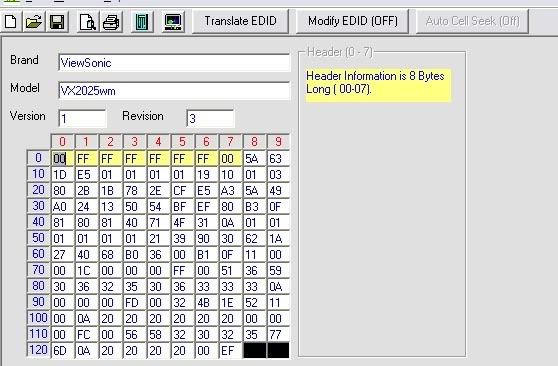
hi, i'm having the same problem with this monitor. I tried running this program, but I didn't see the thing you guys did with the screen wiggling, but I have been able to read the edid from both vga and dvi.

Can someone please post their PORT1.TXT and PORT2.TXT from their floppy drive after running this program? this would help A LOT, and I can post a detailed explanation once I get this working

EDIT: I have figured out a couple differences in the files, mostly the 21st hex. i am willing to bet anyone that posts their port2.txt that their 21st hex is 80 (that means it's a digital connection). the last hex is for a checksum, so those might be the only two differences in the 2 edid's. I still haven't gotten my dvi working, but if someone can please post their port1.txt and port2.txt i would GREATLY appreciate it!

Last edited by KenDawg; 07-14-2006 at 11:29 PM..
  #18  
Old 07-19-2006, 11:16 AM
daphatgrant I'm w/Stoopid ^, 6.7 Years
 
daphatgrant is offline
Well I just ordered mine, saw this thread and was able to cancel in time. WTF is wrong with this LCD? I hope that they are able to get a fix out to you guys relatively soon, because this is rediculous.
__________________
1. A high post count does not equal an intelligent poster.
2. My best description of it was Being hit in the face with the Bat of pain, by Sammy Sosa, while driving a Semi truck, loaded with explosives, powered by a rocket engine, fueled by dark matter... - Evil Juggalo
3. This thread has potential. We will need to harvest this potential with more letters, witty comments, and overall bad advice. Some pictures are also a great idea, because hot chicks rule. - khanable
4. PS: I had a threesome with Jessica Biel and Jessica Alba last night over yahoo chat. Jessica Biel sounds like a man on the mic, pretty strange. They must audacity the shit out of her on every movie.. - Rofl-Mic-Lofl
  #19  
Old 07-23-2006, 06:07 PM
selflove n00bie, 3.6 Years
 
selflove is offline
I had the same problem, twice. The first time it happened to me 1 week after purchase and so I exchanged it. The second time was yesterday. I decided to call Viewsonic support and they gave me the solution to fix it:

1. With the computer on, plug in both DVI and VGA to the video card and the VX2025 monitor.
2. turn off computer
3. remove VGA connector
4. disconnect power to the monitor. Wait 5 seconds and then plug it back in.
5. restart PC.

For me, I run two monitors. After following the steps, I plugged the VGA to my 2nd monitor. Both monitors would show the POST screen but when I booted to Windows, the VX2025 did not have a signal. In the nvidia classic control panel, I had to set the VX2025 as the primary display and also Extend Desktop onto the monitors in order to get the VX2025 working in Windows again.
  #20  
Old 08-04-2006, 12:14 PM
zflajs Limp Gawd, 4.4 Years
 
zflajs is offline
Quote:
Originally Posted by selflove
I had the same problem, twice. The first time it happened to me 1 week after purchase and so I exchanged it. The second time was yesterday. I decided to call Viewsonic support and they gave me the solution to fix it:

1. With the computer on, plug in both DVI and VGA to the video card and the VX2025 monitor.
2. turn off computer
3. remove VGA connector
4. disconnect power to the monitor. Wait 5 seconds and then plug it back in.
5. restart PC.
Thank for sharing this information. I just woke up to the FedEx guy bringing me my new 4400+x2. Since I was up I decided to get on my computer... turned on the computer, got through the windows screen and just sat there looking at a blank screen. After switching DVI ports, rebooting 2-3 times my heart dropped. I KNEW this was the DVI problem that everyone had been complaining about but something that I overlooked.

The above process worked like a charm with me and thank god too (supposed to be upgrading my computer today.) One thing to point out with this abovve process, if you have a dual DVI graphics card, slap on a VGA to DVI adapter and the above process will still work.
Reply


Thread Tools Search this Thread
Search this Thread:

Advanced Search

Posting Rules
You may not post new threads
You may not post replies
You may not post attachments
You may not edit your posts

BB code is On
Smilies are On
[IMG] code is On
HTML code is Off

Forum Jump


All times are GMT -5. The time now is 11:38 AM.


Valid XHTML 1.0 Transitional

Copyright ©2000 - 2010, Jelsoft Enterprises Ltd.
Copyright 2000 - 2009 KB Networks, Inc.