Are there big differences between H-IPS A-TW panels (as used in NEC 2690WUXi or new iMac) and older S-IPS (used in HAZRO HZ24W, NEC 2490WUXi or NEC LCD20WGX2)? Anyone had a chance to compare them? Not sure if it's worth waiting for more H-IPS monitors available or just stick with the older panels. What do you think?
![[H]ard|Forum](/styles/hardforum/xenforo/logo_dark.png)
Navigation
Install the app
How to install the app on iOS
Follow along with the video below to see how to install our site as a web app on your home screen.
Note: This feature may not be available in some browsers.
More options
You are using an out of date browser. It may not display this or other websites correctly.
You should upgrade or use an alternative browser.
You should upgrade or use an alternative browser.
H-IPS vs S-IPS
- Thread starter czajunia
- Start date
H-IPS is just a variation of IPS technology with a different pixel structure to improve the aperture ratio: http://link.aip.org/link/?DTPSDS/35/245/1
I took these pictures a while back:
AS-IPS (NEC 20WMGX2):
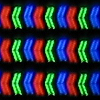
H-IPS (NEC LCD2490WUXi):

Visually, the differences are minor. H-IPS panels have less spacing between the pixels and a slightly higher contrast ratio, and H-IPS panels don't have the sparkly look that S-IPS panels have. Other than that, they're similar.
The NEC LCD2490WUXi, NEC LCD2690WUXi, Hazro HZ24W, Hazro HZ26W, Planar PX2611W, and the 24" iMac all have H-IPS panels, but the Planar and the iMac don't have the A-TW polarizer. The A-TW polarizer improves black viewing angles and gets rid of the annoying glow that IPS panels have at slight angles, which gives it better visual contrast.
Here is a comparison shot I took between the NEC LCD2690WUXi and the Planar:
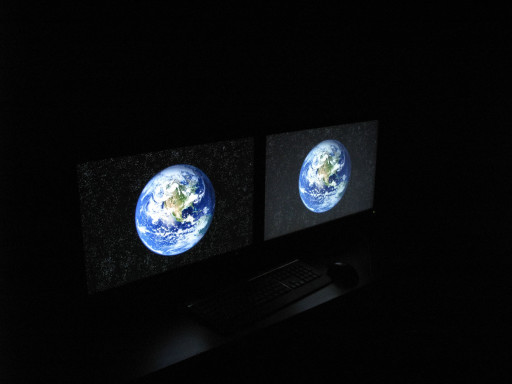
That pretty much gives the NEC and Hazro monitors the best viewing angles out of all the LCD monitors out there, which makes it look good even in a dark room.
I took these pictures a while back:
AS-IPS (NEC 20WMGX2):
H-IPS (NEC LCD2490WUXi):
Visually, the differences are minor. H-IPS panels have less spacing between the pixels and a slightly higher contrast ratio, and H-IPS panels don't have the sparkly look that S-IPS panels have. Other than that, they're similar.
The NEC LCD2490WUXi, NEC LCD2690WUXi, Hazro HZ24W, Hazro HZ26W, Planar PX2611W, and the 24" iMac all have H-IPS panels, but the Planar and the iMac don't have the A-TW polarizer. The A-TW polarizer improves black viewing angles and gets rid of the annoying glow that IPS panels have at slight angles, which gives it better visual contrast.
Here is a comparison shot I took between the NEC LCD2690WUXi and the Planar:
That pretty much gives the NEC and Hazro monitors the best viewing angles out of all the LCD monitors out there, which makes it look good even in a dark room.
ToastyX thank's a loooot! That's a great explanation. Sweeeet.... I think I am starting to have much clearer picture now and the Hazro looks like the winner again. I was leaning towards NEC 20WMGX2 for a moment - I wanted to wait until there's more IPS options avilable in the 24'' department. I even started considering NEC 2690WUXi even though I don't need such a powerful monitor. I simply couldn't find too much information about what panels Hazro uses in their monitors and how they compare with the other IPS panels available here in UK. Thank's again!
Berek Halfhand
Weaksauce
- Joined
- Apr 14, 2008
- Messages
- 66
The Doublesight DS-263N 26" is a H-IPS as its based off of the Planar, correct?
H-IPS is just a variation of IPS technology with a different pixel structure to improve the aperture ratio: http://link.aip.org/link/?DTPSDS/35/245/1
I took these pictures a while back:
AS-IPS (NEC 20WMGX2):
H-IPS (NEC LCD2490WUXi):
Almost looks like they put a blur/diffraction filter in front of the pixel structure on the second. I tried to take a pic of this on my 3007-hc but my camera macro wasn't good enough.
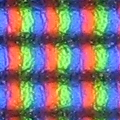
I took too bright of a picture, but you can still see that the pixels on the Apple point to the right instead of the left like on the 20WMGX2. The pixels on H-IPS panels are straight, and the gap between the rows is also smaller. If I could take a picture of a glossy 24" iMac, I could probably get a much clearer picture.
Also, I found this:
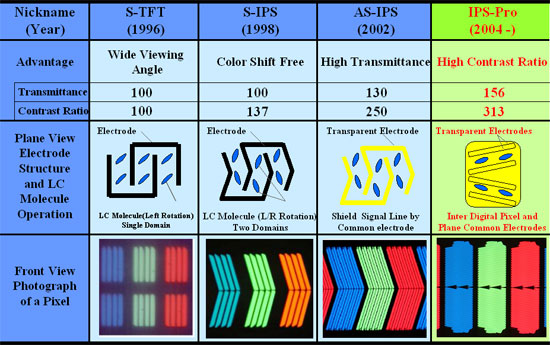
H-IPS looks very similar to IPS-Pro, also known has IPS-Alpha. I don't know if they're the same or not, but they might be based on the same concept.
Here is a picture I found of IPS-Alpha:
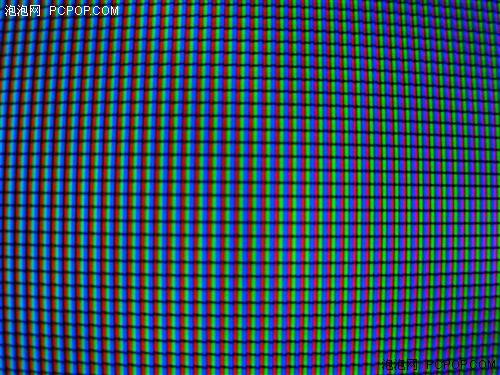
That looks very much like H-IPS. The pixels even stagger the same way as the viewing angles increase towards the edges of the picture, something not shown in my pictures.
As for real-world differences, when I first saw an H-IPS panel, I thought it looked slightly fuzzy compared to S-IPS panels, especially with antialiased text. The pixels seemed to blend together differently. I find that S-IPS panels are sharper while H-IPS panels are a little smoother. Other than that and the anti-glare coating, they're very similar.
Also, I found this:
H-IPS looks very similar to IPS-Pro, also known has IPS-Alpha. I don't know if they're the same or not, but they might be based on the same concept.
Here is a picture I found of IPS-Alpha:
That looks very much like H-IPS. The pixels even stagger the same way as the viewing angles increase towards the edges of the picture, something not shown in my pictures.
As for real-world differences, when I first saw an H-IPS panel, I thought it looked slightly fuzzy compared to S-IPS panels, especially with antialiased text. The pixels seemed to blend together differently. I find that S-IPS panels are sharper while H-IPS panels are a little smoother. Other than that and the anti-glare coating, they're very similar.
Seems this is an appropriate thread in which to post a photograph of S-IPS pixels:
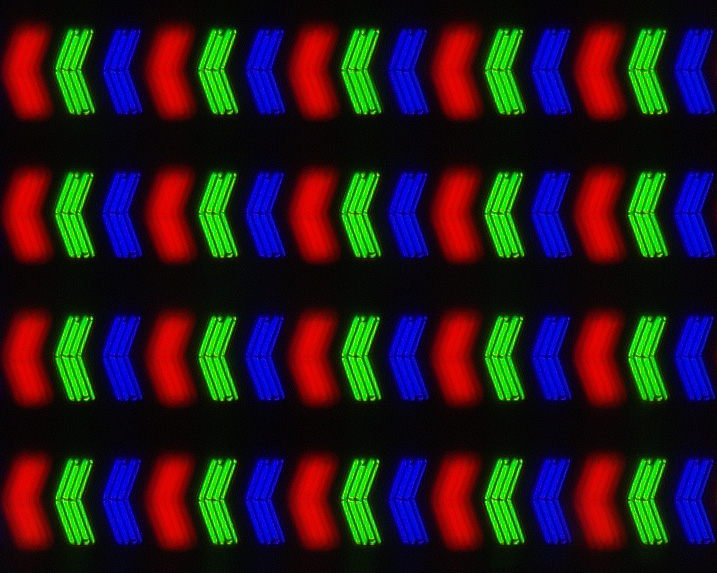
This is my Dell 3007WFP-HC REV A02 displaying white at maximum brightness. If you view it on an LCD with a 0.2505mm dot pitch the magnification will be 143.2x. I covered the part of the screen being photographed with Scotch Packaging Tape; without it, the subpixels were featureless blobs due to the anti-glare coating. The red subpixels were out of focus because they're such a deep red that they focus significantly "nearer" than the green and blue; this is quite noticeable even when looking at the screen with the naked eye. (I could've focus-stacked it with another photo focused on the red, but then the photo would be less real.)
It would be extremely nice to clear up the riddle of which LCDs use the LM300WQ1, LM300WQ3, and LM300WQ5, and which is S-IPS or H-IPS, because there's some conflicting info floating around. So if you have one of these:
Dell 3007WFP-HC REV A01
HP LP3065 revision GSZ001
LG W3000H
Doublesight DS-305W
Hazro HZ30W-Q5 / HZ30WB-Q5
Dell 3008WFP
NEC LCD3090WQXi
HP LP3065 rev GSZ002
and you have a way of taking a photograph that's close-up enough to make out the shape of the pixels, then please post it here.
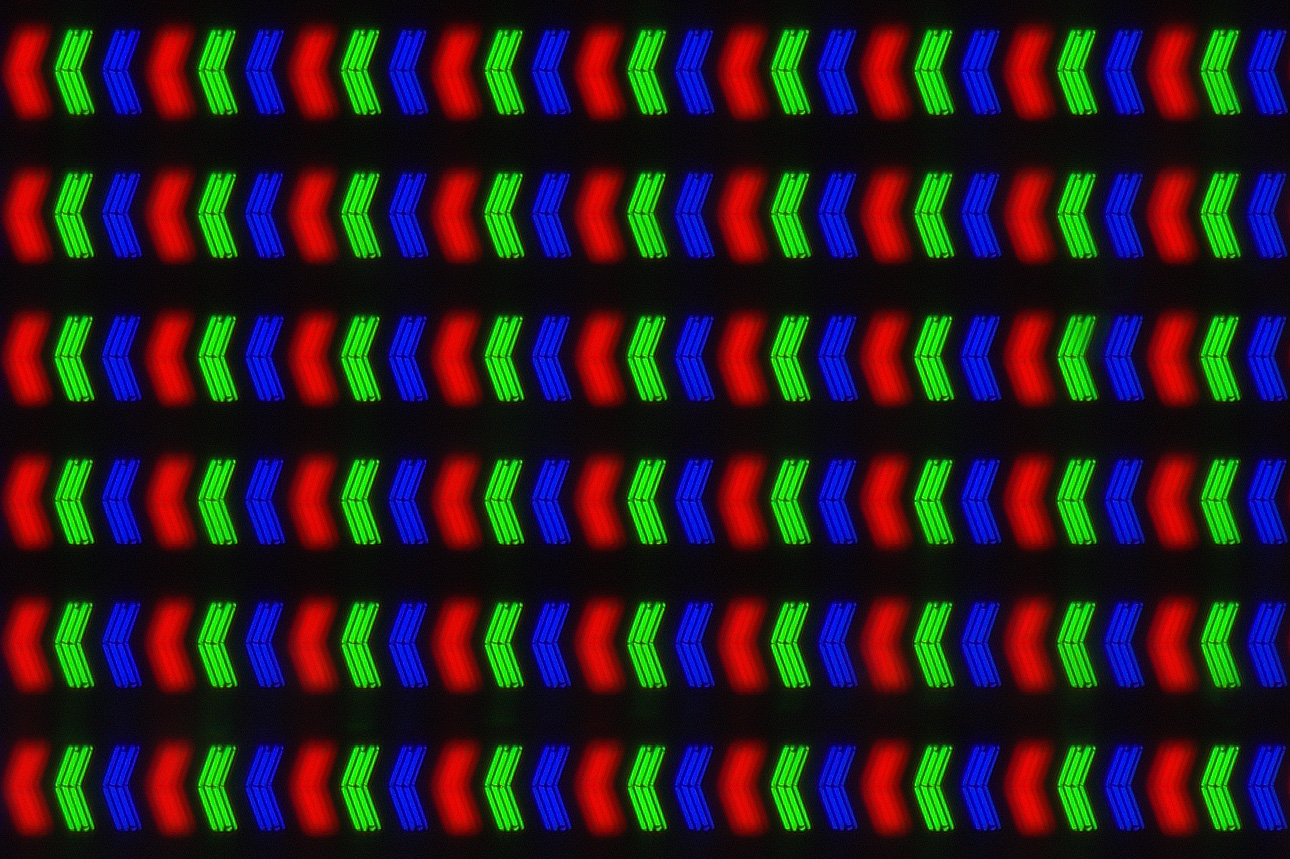
This is my Dell 3007WFP-HC REV A02 displaying white at maximum brightness. If you view it on an LCD with a 0.2505mm dot pitch the magnification will be 143.2x. I covered the part of the screen being photographed with Scotch Packaging Tape; without it, the subpixels were featureless blobs due to the anti-glare coating. The red subpixels were out of focus because they're such a deep red that they focus significantly "nearer" than the green and blue; this is quite noticeable even when looking at the screen with the naked eye. (I could've focus-stacked it with another photo focused on the red, but then the photo would be less real.)
It would be extremely nice to clear up the riddle of which LCDs use the LM300WQ1, LM300WQ3, and LM300WQ5, and which is S-IPS or H-IPS, because there's some conflicting info floating around. So if you have one of these:
Dell 3007WFP-HC REV A01
HP LP3065 revision GSZ001
LG W3000H
Doublesight DS-305W
Hazro HZ30W-Q5 / HZ30WB-Q5
Dell 3008WFP
NEC LCD3090WQXi
HP LP3065 rev GSZ002
and you have a way of taking a photograph that's close-up enough to make out the shape of the pixels, then please post it here.
Last edited:
That picture was awesome 
Far better than mine but at least you can distinguish H-IPS from S-IPS.
3008WFP (supposedly the same panel as LG W3000H and NEC 3090WQXI)
http://privat.bahnhof.se/wb895093/3008wfp/close_up.jpg
(and a photo of the pixel structure in 3090 can be found here: http://nec3090wqxi-test.blogspot.com/ )
As a comparison, 2007WFP S-IPS:
http://privat.bahnhof.se/wb895093/3008wfp/close_up_2007WFP_sips.jpg
A bit OT perhaps, but haven't seen anything about S-PVA, I did have some troubles to get decent focus on it for some reason so it might be hard to make anything out of it.
2007FP S-PVA:
http://privat.bahnhof.se/wb895093/3008wfp/close_up_2007FP_spva.jpg
(the last two images are taken in pivot-mode, the pixels aren't really stacked vertically)
Far better than mine but at least you can distinguish H-IPS from S-IPS.
3008WFP (supposedly the same panel as LG W3000H and NEC 3090WQXI)
http://privat.bahnhof.se/wb895093/3008wfp/close_up.jpg
(and a photo of the pixel structure in 3090 can be found here: http://nec3090wqxi-test.blogspot.com/ )
As a comparison, 2007WFP S-IPS:
http://privat.bahnhof.se/wb895093/3008wfp/close_up_2007WFP_sips.jpg
A bit OT perhaps, but haven't seen anything about S-PVA, I did have some troubles to get decent focus on it for some reason so it might be hard to make anything out of it.
2007FP S-PVA:
http://privat.bahnhof.se/wb895093/3008wfp/close_up_2007FP_spva.jpg
(the last two images are taken in pivot-mode, the pixels aren't really stacked vertically
)Thanks brumwald, for the compliment and for your posted photos!
It looks like the 3008WFP is H-IPS after all (contrary to reports of its being S-IPS), and the 3090WQXi is also H-IPS, in agreement with reports.
It's interesting to see the S-PVA. It looks much like H-IPS but with an even greater fill factor.
It looks like the 3008WFP is H-IPS after all (contrary to reports of its being S-IPS), and the 3090WQXi is also H-IPS, in agreement with reports.
It's interesting to see the S-PVA. It looks much like H-IPS but with an even greater fill factor.
Last edited:
In actuality the "sparkliness/dirtiness" of the AG coating has also reared its ugly head with newer H-IPS panels in the U2410, LP2475W, and even (from what I've read) the 2490WUXI2 model, but the worst I've ever seen is still the Apple Cinema 23".
It seems like the H-IPS panels in the 26" displays have escaped this issue as did the 2490WUXI (original).
LG always likes to keep us guessing don't they
It seems like the H-IPS panels in the 26" displays have escaped this issue as did the 2490WUXI (original).
LG always likes to keep us guessing don't they
<snip>
Visually, the differences are minor. H-IPS panels have less spacing between the pixels and a slightly higher contrast ratio, and H-IPS panels don't have the sparkly look that S-IPS panels have. Other than that, they're similar.
<snip>
In case anybody's curious, here's the 0% black level on the 3007WFP-HC:
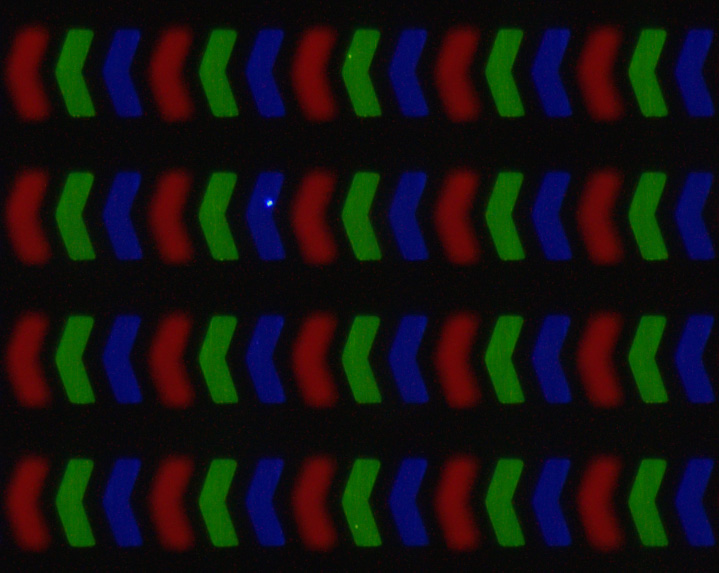
This is a 30 second exposure. The dots are probably specks of dust under the tape.
Here it is displaying ClearType text.
This is a 30 second exposure. The dots are probably specks of dust under the tape.
Here it is displaying ClearType text.
Last edited:
Thanks, Snowdog.
It's a Canon Rebel XSi with Canon 100mm Macro. The 1:1 macro was not close enough to get good detail, so I stacked two Canon 2x Mark II teleconverters onto it. It's not possible to attach this teleconverter to the 100mm Macro, so I pushed it in as far as I could and then secured them together with, guess what, packaging tape. ;-) If I had a short extension tube I would've used that instead. With the packaging tape connection I had to tape the pins on the frontmost TC so as not to confuse the camera into thinking it had an electronic connection to the lens.
Steadying this monstrosity was difficult. I couldn't use a tripod, because it was too sensitive to vibrations coming from the floor. So I put it on top of a heavy block on the same table as the monitor.
The Canon MP-E 65mm lens would be the ultimate for this job, with a sharp 5:1 magnification, but it's almost as expensive as the 3007WFP-HC. With the lens/TC combination I used I got 4.46:1, but it was soft, so I downsized to 66.7%.
It's a Canon Rebel XSi with Canon 100mm Macro. The 1:1 macro was not close enough to get good detail, so I stacked two Canon 2x Mark II teleconverters onto it. It's not possible to attach this teleconverter to the 100mm Macro, so I pushed it in as far as I could and then secured them together with, guess what, packaging tape. ;-) If I had a short extension tube I would've used that instead. With the packaging tape connection I had to tape the pins on the frontmost TC so as not to confuse the camera into thinking it had an electronic connection to the lens.
Steadying this monstrosity was difficult. I couldn't use a tripod, because it was too sensitive to vibrations coming from the floor. So I put it on top of a heavy block on the same table as the monitor.
The Canon MP-E 65mm lens would be the ultimate for this job, with a sharp 5:1 magnification, but it's almost as expensive as the 3007WFP-HC. With the lens/TC combination I used I got 4.46:1, but it was soft, so I downsized to 66.7%.

That's cool, Snowdog. Thanks! It's H-IPS, right?
What do the pixels look like when showing grayscale / partial color values? Do the pixels look different when photographed at a steep angle?
I tried photographing my 3007WFP-HC's S-IPS pixels from an angle, and they looked exactly the same (except of course there was only a narrow line in focus).
What do the pixels look like when showing grayscale / partial color values? Do the pixels look different when photographed at a steep angle?
I tried photographing my 3007WFP-HC's S-IPS pixels from an angle, and they looked exactly the same (except of course there was only a narrow line in focus).
Last edited:
I tried different gray levels and they look the same (adjusting for exposure), so I didn't even dump them from camera. If there are sections on my pixels, my camera is too weak to detect them.
The previous shot is as good as it gets from from my pocket camera (Canon SD880).
The previous shot is as good as it gets from from my pocket camera (Canon SD880).
If an H-IPS LCD is placed next to an S-IPS LCD of the same dot pitch, displaying the same picture, which appears sharper?
I would imagine an S-IPS would look slightly sharper due to the smaller pixels. In theory a display with point-source pixels would be the ultimate in sharpness (assuming dot pitch is kept constant). But is the difference noticeable?
On my S-IPS 3007WFP-HC, 1-pixel-thick white lines look virtually exactly as thick whether they're horizontal or vertical. But on an H-IPS, horizontal lines appear to be slightly thicker, don't they?
I would imagine an S-IPS would look slightly sharper due to the smaller pixels. In theory a display with point-source pixels would be the ultimate in sharpness (assuming dot pitch is kept constant). But is the difference noticeable?
On my S-IPS 3007WFP-HC, 1-pixel-thick white lines look virtually exactly as thick whether they're horizontal or vertical. But on an H-IPS, horizontal lines appear to be slightly thicker, don't they?
Bummrus[H]a
Limp Gawd
- Joined
- Feb 6, 2007
- Messages
- 179
Kinda OT but I thought I'd post this anyway, just for comparison.
Display is OLED from an iRiver S10. Canon Powershot A630 was used to take the photo.
Pixel structure looks very similar to Toasty's & Snowdog's H-IPS shots.
Sadly I could not do the tape trick because of the protective plastic covering the face of the device.
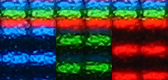
Display is OLED from an iRiver S10. Canon Powershot A630 was used to take the photo.
Pixel structure looks very similar to Toasty's & Snowdog's H-IPS shots.
Sadly I could not do the tape trick because of the protective plastic covering the face of the device.
Bummrus[H]a
Limp Gawd
- Joined
- Feb 6, 2007
- Messages
- 179
The display is portrait with a resolution of 128x96. There are no options in the settings to change it to landscape, only flip it vertically.

Whoisthisreally
[H]ard|Gawd
- Joined
- Feb 14, 2009
- Messages
- 1,143
Excellent! You've shed light upon our understanding of H-IPS.


Nashbirne, nice work photographing that H-IPS panel! I wouldn't have thought the 18-55mm IS would do so well reversed (that's the kit lens you used, right?). Did you use a reversal adapter or something jerry-rigged?
jangaboo, that LG 37LH30 has a much bigger fill factor than my Dell 3007WFP-HC... it doesn't seem fair to call them both S-IPS.
Lock the focus first by half-pressing, then move the camera forward/backward to find the sharpest focus (while half-pressed) before taking the shot.
If your camera has a manual focus mode, use it, and focus as close as possible (and again, move the camera forward/backward to find the sharpest focus).
jangaboo, that LG 37LH30 has a much bigger fill factor than my Dell 3007WFP-HC... it doesn't seem fair to call them both S-IPS.
What kind of camera settings do you need to get pics like that? Everytime I try I just get an all grey image. I have a Canon PowerShot A560, with macro on, as close to the screen as possible.
Lock the focus first by half-pressing, then move the camera forward/backward to find the sharpest focus (while half-pressed) before taking the shot.
If your camera has a manual focus mode, use it, and focus as close as possible (and again, move the camera forward/backward to find the sharpest focus).
> have anyone seen The Samsung's PLS matrix?
Oleg's review has photos:
http://www.xbitlabs.com/articles/monitors/display/samsung-sa850.html
Oleg's review has photos:
http://www.xbitlabs.com/articles/monitors/display/samsung-sa850.html
damn i want a 2490wuxi 1st gen or even better 2690wuxi first gen. theyre near impossible to find new, especially the 2690.
Is the 2690 first generation better than the 2490 first generation?
Is the 2690 first generation better than the 2490 first generation?
Many of us preferred the 2490, since it was standard gamut. The 2690 is wider gamut, and it's sRGB emulation mode wasn't that good.
Many of us preferred the 2490, since it was standard gamut. The 2690 is wider gamut, and it's sRGB emulation mode wasn't that good.
Here in Europe I can get the the 2690 first generation for the same price as the 2490 first generation, so I was wondering.
I looked at this video:
http://www.youtube.com/watch?v=1mJXLh1d5OU
I noticed some differences especially that the left display has more vibrant grass colors, while the right display had warmer colors and higher brightness (brightness looks like it would be a little bit too invasive when the lights are turned off though).
I think also the 2690 is from 2006, while the 2490 is from 2008, right?
Last edited: