![[H]ard|Forum](/styles/hardforum/xenforo/logo_dark.png)

JakFrost
Limp Gawd
- Joined
- Dec 2, 2005
- Messages
- 241
Just wanted to write up my experiences with my RAID problems.
I have four of the Western Digital Caviar SE16 500 GB WD5000AAKS 16 MB SATA-II 300 MB/s hard drive models. Previously I had them configured in a 2.0 TB (1.5 TB usable) array on my Silicon Image 3114 PCI SATA-I 150 MB/s RAID 0,1,5 Onboard Controller with firmware 5.4.03. One day I lost came home to find that 3 drivers dropped out of the array and only 1 drive was left and that the array was destroyed. Luckily the array was used mostly for archive storage for videos that I routinely backed up to DVD's so I didn't lose any data. (I presume that only the one drive that was left in the array was the cause of the problem, timing out too long while doing error recovery on a bad sector, that actually caused the other 3 drives from being dropped, instead of vice versa as it should have happened.)
None of the utilities that Silicon Image provides were able to restore the array from the other 3 drives, even though the drives that dropped should have been able to be brought online as an array and the single drive left in the array should have been able to be brought back in and rebuilt. I e-mailed the vendor with a complete case report and all details but nobody responded. An understandable experience with a second-rate foreign vendor that mostly supplies motherboard manufacturers with crappy software RAID chips. (The array while it was operational for many months was dog slow because it was software RAID5 and the parity calculations were interrupting the CPU constantly on every write making my system slow and unresponsive any time I would perform any extended writes to the array. Learned my lesson to never use Silicon Image PCI based software RAID5 and recommend against these chips now to everyone.)
After that experience I took my drives off the cheap Silicon Image controller and made a nVidia RAID1 (mirror) array with 2 x 500 GB and then took the other two drives to be used for external storage for on-site and off-site storage drives. A few months back I came back home to find that one of the drives in the new array with an Error status. After rebooting the system and re-adding the drive to the array everything worked fine without any errors. Last week the same thing happened again and the drive dropped from the array again. I re-added it and no errors were found and the array is running again.
So today I went to research what was causing this and I came across a mention of the Time-Limited Error Recovery feature on the Western Digital RE models. The explanation of TLER that feature sounded exactly like the problem that I was having. After more research I found the WDTLER utility that runs from a DOS boot disk.
I used this utility to enable TLER on my SE16 drives to prevent them from timing out too long during error recovery on my RAID1 arrays and hopefully this issue with dropped drives will not happen again.
If you have a Western Digital Caviar SE, SE16, GP or Raptor hard disk drive being used in a RAID array make sure to Enable TLER using the WDTLER utility to put a limit on the error recovery time from a read or write error due to a bad sector or the RAID controller/driver will drop your hard disk from the array thinking that it has failed any time that the hard drive takes too long to recover.
If you have a Western Digital Caviar RE, RE2, RE2-GP or Raptor hard disk drive being used as a stand-alone desktop drive that is not in a RAID array then you should Disable TLER using the WDTLER utility to give the drive more time to recover from read or write errors due to bad sectors.
If your hard disk is dropped from an array it will need to be re-added manually requiring the entire hard disk to be rebuild and resynchronized with the array causing you performance problems. If two hard disks happen to be dropped from the array at around the same time then your array will be marked as damaged and the data in the array will be destroyed requiring a complete restore from backup or a manual recreation of the array using the vendor's specialized tools.
Update: (2008-09-15) As an answer to some of the posts. Enabling or disabling the TLER settings on your hard drives will not decrease speed or performance and it will not cause you any data loss and you will not have to recreate your arrays or reformat your drives. Changing of the setting is invisible to the system and can be switched without any changes, damage, or problems.
Update: (2008-09-15)It has now been 6-months since I enabled TLER on my drives and my computer has been running pretty much 14-hours a day everyday for months and recently 24-hours a day for the last month and there has been no issues at all with the drives and no more dropped hard disks from the arrays.
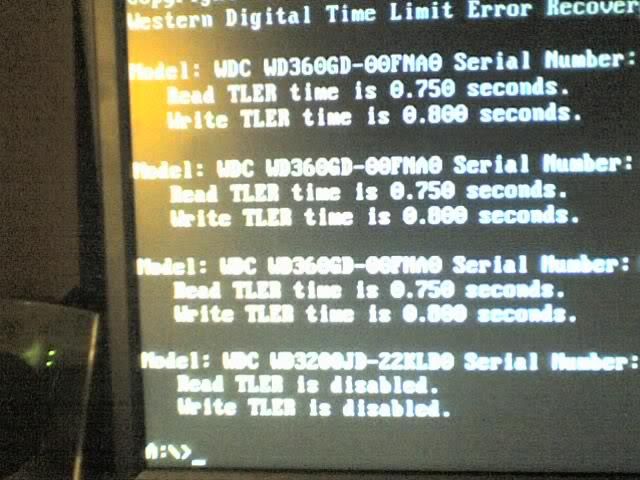
Before WDTLER - TLER Disabled
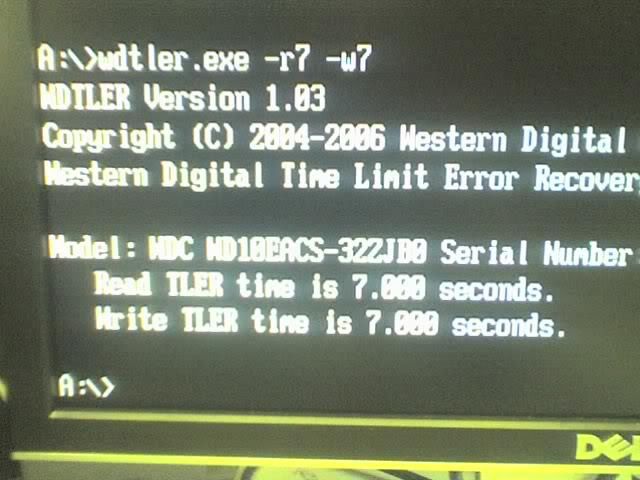
After WDTLER - TLER Enabled
[size=-2]
CPU: AMD Opteron 175 Dual-Core 2.2 GHz 1 MB 90 nm 939 11x CCBWE 0543TPMW - 2,563 MHz (233x11x4), 1.50 V (1.55 V x 100.0 %)
FAN: Zalman CNPS9500 LED 92 mm Fan+Heatsink + Arctic Silver 5 Thermal Paste 99.9 % - 35 C Idle, 45 C Load
MOB: DFI LanParty UT SLI-DR Expert 939 nF4 PCI-e Rev.AA0 - BIOS: 2006-04-06 Modded, LDT 1.20 V, Chipset 1.52 V, 42 C Load
RAM: Mushkin 4x 1 GB XP4000 Redline 991493 DDR500 3-3-2-8 2.6-2.9 V CE-6 - 233 MHz (1:1) 2T 3-3-2-8, 2.80 V
VID: eVGA nVidia 8800 GTS 512 MB G92 670/972 MHz PCI-e 16x 2xDVI 1xSVid 1xHDTV - 750/1100 MHz Overclock, 65% Fan, 58C Load
SAT: Silicon Image 3114 PCI SATA-I 150 MB/s RAID 0,1,5 Onboard Controller FW: 5.3.14 Modded
HDD: Western Digital Caviar SE16 320 GB 16 MB SATA-II 300 MB/s - 2x in nVidia 298 GB Mirror Array (RAID1)
HDD: Western Digital Caviar SE16 500 GB 16 MB SATA-II 300 MB/s - 2x in nVidia 465 GB Mirror Array (RAID1)
NIC: Marvell Yukon 88E8001 Gigabit Onboard PCI NIC
SOU: Creative Labs Sound Blaster X-Fi Xtreme Music 24-bit 128-Voice 109dB SNR
SOU: RealTek ALC850 AC'97 Rev 2.3 8-Channel Onboard Audio
DVD: 2x NEC ND-3540A DVD+-RW SL/DL 16X DVD 48X CDR - FW: 1.06
POW: OCZ PowerStream 520W SLI ADJ ATX2.0 EPS12, +3.3V 28A +5V 40A +12V 33A
CAS: Lian-Li PC-V1200 Plus Mid-ATX Aluminum 4x5.25 6x3.5 2x120mm
[/size]
I have four of the Western Digital Caviar SE16 500 GB WD5000AAKS 16 MB SATA-II 300 MB/s hard drive models. Previously I had them configured in a 2.0 TB (1.5 TB usable) array on my Silicon Image 3114 PCI SATA-I 150 MB/s RAID 0,1,5 Onboard Controller with firmware 5.4.03. One day I lost came home to find that 3 drivers dropped out of the array and only 1 drive was left and that the array was destroyed. Luckily the array was used mostly for archive storage for videos that I routinely backed up to DVD's so I didn't lose any data. (I presume that only the one drive that was left in the array was the cause of the problem, timing out too long while doing error recovery on a bad sector, that actually caused the other 3 drives from being dropped, instead of vice versa as it should have happened.)
None of the utilities that Silicon Image provides were able to restore the array from the other 3 drives, even though the drives that dropped should have been able to be brought online as an array and the single drive left in the array should have been able to be brought back in and rebuilt. I e-mailed the vendor with a complete case report and all details but nobody responded. An understandable experience with a second-rate foreign vendor that mostly supplies motherboard manufacturers with crappy software RAID chips. (The array while it was operational for many months was dog slow because it was software RAID5 and the parity calculations were interrupting the CPU constantly on every write making my system slow and unresponsive any time I would perform any extended writes to the array. Learned my lesson to never use Silicon Image PCI based software RAID5 and recommend against these chips now to everyone.)
After that experience I took my drives off the cheap Silicon Image controller and made a nVidia RAID1 (mirror) array with 2 x 500 GB and then took the other two drives to be used for external storage for on-site and off-site storage drives. A few months back I came back home to find that one of the drives in the new array with an Error status. After rebooting the system and re-adding the drive to the array everything worked fine without any errors. Last week the same thing happened again and the drive dropped from the array again. I re-added it and no errors were found and the array is running again.
So today I went to research what was causing this and I came across a mention of the Time-Limited Error Recovery feature on the Western Digital RE models. The explanation of TLER that feature sounded exactly like the problem that I was having. After more research I found the WDTLER utility that runs from a DOS boot disk.
I used this utility to enable TLER on my SE16 drives to prevent them from timing out too long during error recovery on my RAID1 arrays and hopefully this issue with dropped drives will not happen again.
If you have a Western Digital Caviar SE, SE16, GP or Raptor hard disk drive being used in a RAID array make sure to Enable TLER using the WDTLER utility to put a limit on the error recovery time from a read or write error due to a bad sector or the RAID controller/driver will drop your hard disk from the array thinking that it has failed any time that the hard drive takes too long to recover.
If you have a Western Digital Caviar RE, RE2, RE2-GP or Raptor hard disk drive being used as a stand-alone desktop drive that is not in a RAID array then you should Disable TLER using the WDTLER utility to give the drive more time to recover from read or write errors due to bad sectors.
If your hard disk is dropped from an array it will need to be re-added manually requiring the entire hard disk to be rebuild and resynchronized with the array causing you performance problems. If two hard disks happen to be dropped from the array at around the same time then your array will be marked as damaged and the data in the array will be destroyed requiring a complete restore from backup or a manual recreation of the array using the vendor's specialized tools.
Update: (2008-09-15) As an answer to some of the posts. Enabling or disabling the TLER settings on your hard drives will not decrease speed or performance and it will not cause you any data loss and you will not have to recreate your arrays or reformat your drives. Changing of the setting is invisible to the system and can be switched without any changes, damage, or problems.
Update: (2008-09-15)It has now been 6-months since I enabled TLER on my drives and my computer has been running pretty much 14-hours a day everyday for months and recently 24-hours a day for the last month and there has been no issues at all with the drives and no more dropped hard disks from the arrays.
Before WDTLER - TLER Disabled
Code:
WDTLER Version 1.03
Copyright (C) 2004-2006 Western Digital Corporation
Western Digital Time Limit Error Recovery Utility

Model: WDC WD5000KS-00MNB0 Serial Number: WD-WMANU1234567
   Read TLER is disabled.
   Write TLER is disabled.

Model: WDC WD5000KS-00MNB0 Serial Number: WD-WMANU1234567
   Read TLER is disabled.
   Write TLER is disabled.

Model: WDC WD3200KS-00PFB0 Serial Number: WD-WCAPD1234567
   Read TLER is disabled.
   Write TLER is disabled.

Model: WDC WD3200KS-00PFB0 Serial Number: WD-WCAPD1234567
   Read TLER is disabled.
   Write TLER is disabled.
After WDTLER - TLER Enabled
Code:
WDTLER Version 1.03
Copyright (C) 2004-2006 Western Digital Corporation
Western Digital Time Limit Error Recovery Utility

Model: WDC WD5000KS-00MNB0 Serial Number: WD-WMANU1234567
   Read TLER time is 7.000 seconds.
   Write TLER time is 7.000 seconds.

Model: WDC WD5000KS-00MNB0 Serial Number: WD-WMANU1234567
   Read TLER time is 7.000 seconds.
   Write TLER time is 7.000 seconds.

Model: WDC WD3200KS-00PFB0 Serial Number: WD-WCAPD1234567
   Read TLER time is 7.000 seconds.
   Write TLER time is 7.000 seconds.

Model: WDC WD3200KS-00PFB0 Serial Number: WD-WCAPD1234567
   Read TLER time is 7.000 seconds.
   Write TLER time is 7.000 seconds.
[size=-2]
CPU: AMD Opteron 175 Dual-Core 2.2 GHz 1 MB 90 nm 939 11x CCBWE 0543TPMW - 2,563 MHz (233x11x4), 1.50 V (1.55 V x 100.0 %)
FAN: Zalman CNPS9500 LED 92 mm Fan+Heatsink + Arctic Silver 5 Thermal Paste 99.9 % - 35 C Idle, 45 C Load
MOB: DFI LanParty UT SLI-DR Expert 939 nF4 PCI-e Rev.AA0 - BIOS: 2006-04-06 Modded, LDT 1.20 V, Chipset 1.52 V, 42 C Load
RAM: Mushkin 4x 1 GB XP4000 Redline 991493 DDR500 3-3-2-8 2.6-2.9 V CE-6 - 233 MHz (1:1) 2T 3-3-2-8, 2.80 V
VID: eVGA nVidia 8800 GTS 512 MB G92 670/972 MHz PCI-e 16x 2xDVI 1xSVid 1xHDTV - 750/1100 MHz Overclock, 65% Fan, 58C Load
SAT: Silicon Image 3114 PCI SATA-I 150 MB/s RAID 0,1,5 Onboard Controller FW: 5.3.14 Modded
HDD: Western Digital Caviar SE16 320 GB 16 MB SATA-II 300 MB/s - 2x in nVidia 298 GB Mirror Array (RAID1)
HDD: Western Digital Caviar SE16 500 GB 16 MB SATA-II 300 MB/s - 2x in nVidia 465 GB Mirror Array (RAID1)
NIC: Marvell Yukon 88E8001 Gigabit Onboard PCI NIC
SOU: Creative Labs Sound Blaster X-Fi Xtreme Music 24-bit 128-Voice 109dB SNR
SOU: RealTek ALC850 AC'97 Rev 2.3 8-Channel Onboard Audio
DVD: 2x NEC ND-3540A DVD+-RW SL/DL 16X DVD 48X CDR - FW: 1.06
POW: OCZ PowerStream 520W SLI ADJ ATX2.0 EPS12, +3.3V 28A +5V 40A +12V 33A
CAS: Lian-Li PC-V1200 Plus Mid-ATX Aluminum 4x5.25 6x3.5 2x120mm
[/size]