• Some users have recently had their accounts hijacked. It seems that the now defunct EVGA forums might have compromised your password there and seems many are using the same PW here. We would suggest you UPDATE YOUR PASSWORD and TURN ON 2FA for your account here to further secure it. None of the compromised accounts had 2FA turned on.
    Once you have enabled 2FA, your account will be updated soon to show a badge, letting other members know that you use 2FA to protect your account. This should be beneficial for everyone that uses FSFT.

First SFF build! mmmm QPack'd quadcores of 8800gtsness!

JeffK95Z

n00b
Joined
Jan 4, 2008
Messages
8
:)

Hey guys,

In an effort to build a portable gaming rig this time around (old machine is in a giant Thermaltake Xaser case and weights about 50 lbs) I scored the following during christmas/boxing day sales:

Case: X-QPack gen. 2
Power Supply: Antec NeoPower HE 500 (from old PC - selling old PC w/ qpack PS)
Motherboard: Gigabyte DSR2
CPU: Q6600 G0
Cooling: ThermalRight Ultima-90 (thx to MaximumOverKill's thread in the gallery!)
RAM: 2 x 2GB Patriot 4-4-4-12
Video: Galaxy 8800 GTS 512MB
Optical: Black DVD SATA
HDD: Maxtor 200 GB (from old PC - SATA 150 only)
HDD Case: Antec MX-1
Keyboard: Logitech G15 gen. 2
Mouse: Logitech G9
Monitor: Dell 2005FPW (from old PC)
Headset: Icemat Siberia (from old PC)

So my story begins without the Ultima-90... Using stock cooling I put the machine together and started running some tests...

Idle temps around high 40's
4 instances of Prime95, 100% cpu usage bought the temp. upto 77 degrees within about 15 minutes or so.

Too hot!!

So poking around, I found Max.OverKills microfly gallery and how he got the Ultima-90 to fit. I decided to go down the same road... Back to NCIX I go! (Sure is nice to live within 10 minutes of the place!)

1/2 hour later, armed with a hacksaw and some masking tape, i was all set to chop up my shiny new case - much to my wife's dismay!
P1050026.jpg


VICTORY IS MINE!

P1050027.jpg


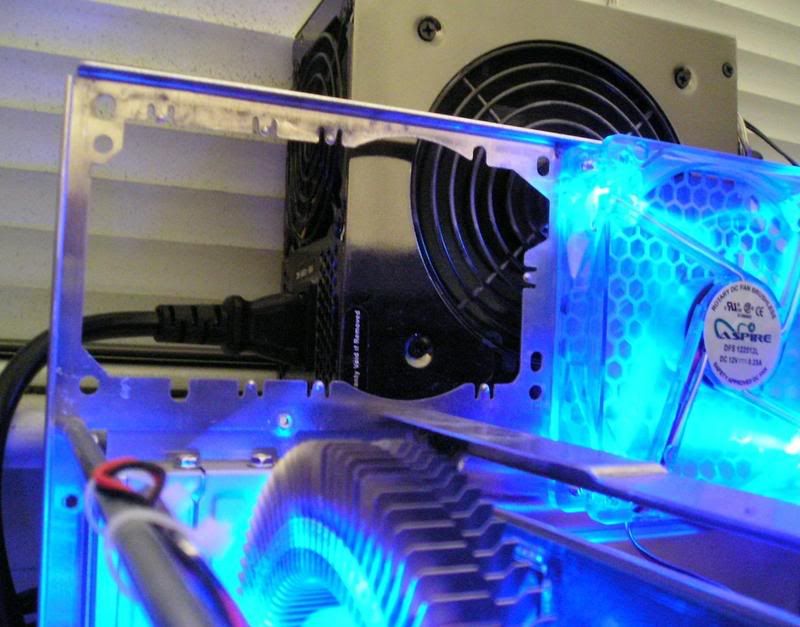
Some additional metal work was required to fit the cooler on this Giga-byte board however... One of the brackets wouldn't fit as it was to close to the NorthBridge? heatsink... so I had to show it who's boss...

This was a bit of a pain in the ass... I was used to cutting the buttery soft aluminum of the qpack case... This was MUCH stronger and took probably 10-15 minutes of hacksawing... I was damn close to calling my friend and scoring a dremel to finish it off!!

Basically I just had to file/cut off the rounded edge so it was flush with the threaded hole. It fit just perfect after that!

P1050077.jpg

P1050075.jpg


Once this was done, it was smooth sailing!! Well, aside from the countless ways of trying to tuck wiring away to make the best of air flow :)

The only other mod I did was to mount another 80mm intake fan on the right-hand side of the front panel. The qpack comes with just a single intake fan on the left side and i felt that the case needed more airflow! Thankfully there are lots of perforated holes already in the case so a few zipties later, i had a new fan!

So 1 intake fan drawing air in on both sides... 1 for the cpu side, 1 for the gpu side! Things should be flowing nicely!

Button everything up and run the same tests...

Idle's around 42 and full prime loading around 62. So about 8 degrees drop in temp! And i'm still not done! As you can in the pictures, the Ultima-90 draws air in from the side, and my case has solid window'd walls! So no doubt its starving for air... I plan on replacing the window with some sort of mesh opening to allow it to get direct cool air.

Also, i placed both of the qpack's thermal probes along each side in the air flow path. The case seems to be staying really nice and cool @ around 25 degrees or so.

The one other thing to note in my build is that i don't have the harddrive in the qpack case. I bought an actively cooled Antec MX-1 E-SATA enclosure that you can see on top of the case. I did this with the idea of keeping the extra heat generated by the HDD out of the case. No idea if it was required, but I liked the idea :)

Some additional pictures:

P1050083.jpg


P1060090.jpg


P1060109.jpg


P1060104.jpg


P1060100.jpg


P1060097.jpg
 
nice rig, and a nice read :)

i like playing on my belly too, laying down on the carpet while gaming is great for posture, but how do you keep your rig from drawing all the dust in from the carpet (joke)
 
sorry, should of mentioned... we were helping some friends by house sitting over christmas... I didn't wanna wait to get home to build the box, so i did it @ their place

Machine is setup @ our place now on a real desk in my den :)
 
The thermal probes could be off by as much as 10°C (that seems to be the general concensus) but regardless, good job. I m moving everything from a QPack to a LanboxLite this week, wish me luck.
 
Are you oc'd? Those temps seem awefully high for stock. What are you using for readings?
Core temp seems to be the most accurate for 32bit and Everest for 64.
 
stock 2.4 ghz and using coretemp for the readings.

the case temp's seem to be cool @ around 25 degrees, but then if the qpack thermal probes are reading low, the case temps could be around 35. Think that could attribute to the high cpu temps?

and good luck burnin8r! why the change to the lanbox?
 
Nice job, but you'll need to lap your heat sink because the Thermalrights are concave by design to match the concavity of the Intel heat spreader. It's only concave one way though, and since our heatsinks are rotated 90 degrees, it doesn't make good contact. I must have taken a 1mm off of the base to get it flat. You can do the mesh mod like I did or reverse your rear 120mm fan so it's blowing in instead of sucking out. If you do the mesh mod I would reverse your 120mm that's mounted on your HS so that it's pull air through the HS.

Also, it would have probably been easier to nibble out the NB aluminum heat sink.
 
stock 2.4 ghz and using coretemp for the readings.

and good luck burnin8r! why the change to the lanbox?

If you re using coretemp then I wouldn t question your numbers... if you were going by the display on the QPack then I would add 10°C. As much as I <3 my QPack, I am migrating everything to the LanboxLite.

The extra 2 inches of depth helps to keep the optical drives from butting up against the PSU and not having the PSU over the video cards gives me the vertical clearance I need for my non reference 8800gt heat sink / fan (sorry to threadjack) :

clearance_issues.jpg


I like the look of the new QPack but I wish they did more with the interior.
 
burnin8r - I'm guessing you had the old version of the qpack?

In my reading when picking out a case everyone said that the 2nd gen. qpack solved just about all the problems you mentioned.

Max. I thought about working on the NB heatsink, but the look of those plastic push pins that hold it to the motherboard scared me... I didn't wanna break one and be screwed looking for something else to mount it with, hehe

and thx for the kind words on the build everyone!
 
just an update, I ran 4x prime95 (affinity set to each seperate core) overnight and all day while @ work... total run time 15 hours @ 100% cpu.

no errors
max single core temp was 66 degrees.

also, in gaming, the gts800 gets upto 82 degrees with the fan left @ auto... but if I manually set it to 100% fan speed, it never climbs higher then 60.
 
Back
Top