• Some users have recently had their accounts hijacked. It seems that the now defunct EVGA forums might have compromised your password there and seems many are using the same PW here. We would suggest you UPDATE YOUR PASSWORD and TURN ON 2FA for your account here to further secure it. None of the compromised accounts had 2FA turned on.
    Once you have enabled 2FA, your account will be updated soon to show a badge, letting other members know that you use 2FA to protect your account. This should be beneficial for everyone that uses FSFT.

replacing Dell E4200 SSD? 2.5" or 1.8"

Thuleman

Supreme [H]ardness
Joined
Apr 13, 2004
Messages
5,833
Folks,

Anyone have any experience with replacing the SSD in a Dell E4200?
I don't have access to the machine before I need to order a new SSD for it, otherwise I would just have a look myself.

The service manual section on Removing the Solid State Drive shows the SSD, but again, no experience here with what I am looking at.

What I would like to do is to pull the current SSD out, and put a new one (larger capacity) in. Looking at the pic it looks like a normal SATA connection to me, but it also looks like a 1.8" drive on a 2.5" adapter?
 
I did get my hands on this laptop and here is what I found:

SSD mounted, two screwes removed, lower left, upper right. This will likely be the first issue in mounting a non-Dell SSD
e4200ssd1nm5.jpg


chassis with SSD removed
e4200ssd2zd0.jpg


SSD hookups
e4200ssd3zh5.jpg


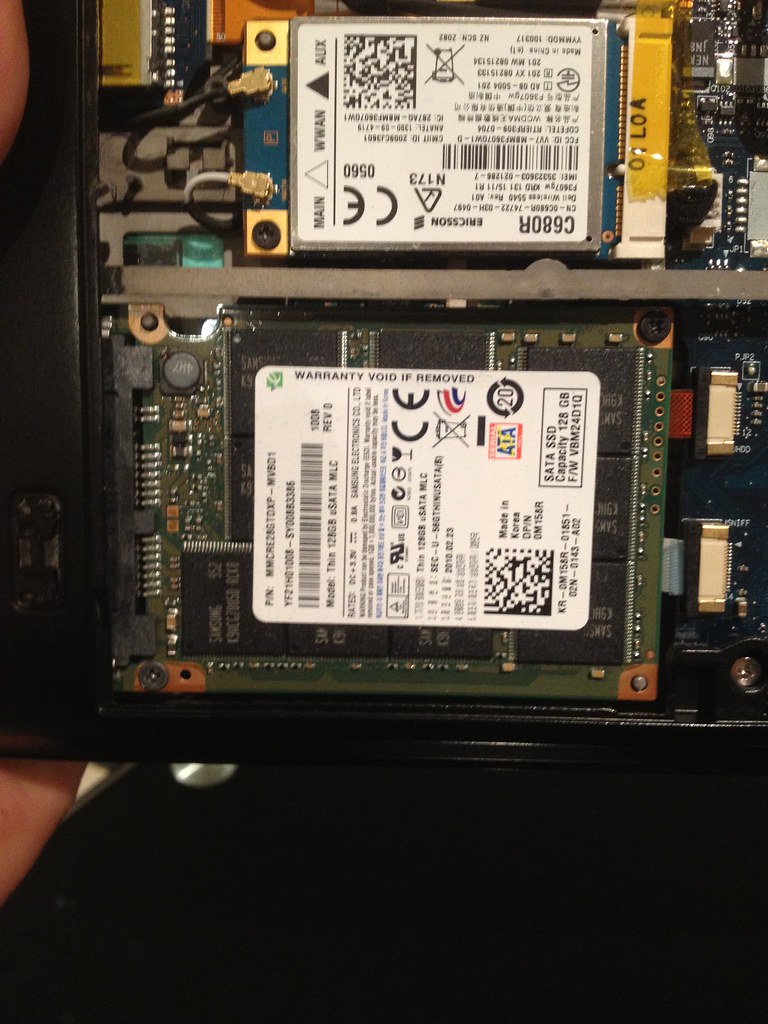
SSD
e4200ssd4ld7.jpg


So, am I doomed? Are aftermarket 3rd party SSDs out? Do I need to sink in a bazillion bucks to buy a bigger one through Dell?
 
Mounting holes might not be standard, but the plug is. 1.8" SATA drives don't use the same size power adapter.
 
Mounting holes might not be standard, but the plug is. 1.8" SATA drives don't use the same size power adapter.

Thanks for the tip, much appreciated.
Now the question is whether I can just pull the drive out of the Transcend TS128GSSD18M-M 1.8" 128GB since that's the only 1.8" at the Egg, and I'd prefer to buy from them as I am ordering a bunch of other stuff as well.

May look around elsewhere and see what's out there.
 
It will void any type of warranty it might have.

Also it might be sonic welded....AKA a PITA to open up.
 
Whether or not that will work, I couldn't tell you. I have a 1.8" SSD in my laptop, and they seem to be a pain to find.
 
Looks like what I need is a Samsung MMCQE28GFMUP-MVA 128GB drive, pain to find indeed.
I bet that's because most all of them are OEM only and go out to all the laptop manufacturers.

Dell will sell me one for $499 + SH.
 
Yeah, I got mine with my laptop. Lenovo put a 64gb Samsung SLC SSD in my X200. Try eBay?
 
I want to get an Intel x18 (80GB) and do so.

???

Thx
 
Last edited:
I'm in this same spot and hoping to order a 1.8" drive that has a better performance characteristic than the samsung. anyone buy a 1.8" drive and mount it in here??

thanks
 
THIS New "caseless" may be the one that Opens up the E4200 to upgrading the SSD:

CES: Toshiba Unveils SSDs For Mobile, Mini-mobile PCs


".....Toshiba's new 2.5-inch SSD, the HG3 line, is available in 64-GB, 128-GB, and 256-GB capacity points, and features a maximum sequential read speed of 250 MB per second and write speed of 180 MB per second, Kumagai said. This compares to 230 MBps and 170 MBps speeds using Toshiba's second-generation NAND.

The HG3 drives are slated to ship in 2.5-inch form factors in both 9.5-mm and 7-mm heights.
The same drive will also be in a 1.8-inch case, or a 1.8-inch Caseless or LIF (low insertion force) form factor for OEM or embedded purposes
......."

http://www.crn.com/storage/222200557;jsessionid=N2DTREMYT4SBHQE1GHPSKH4ATMY32JVN

Guys, Is this finally the solution/form-factor for the E4200?
-
 
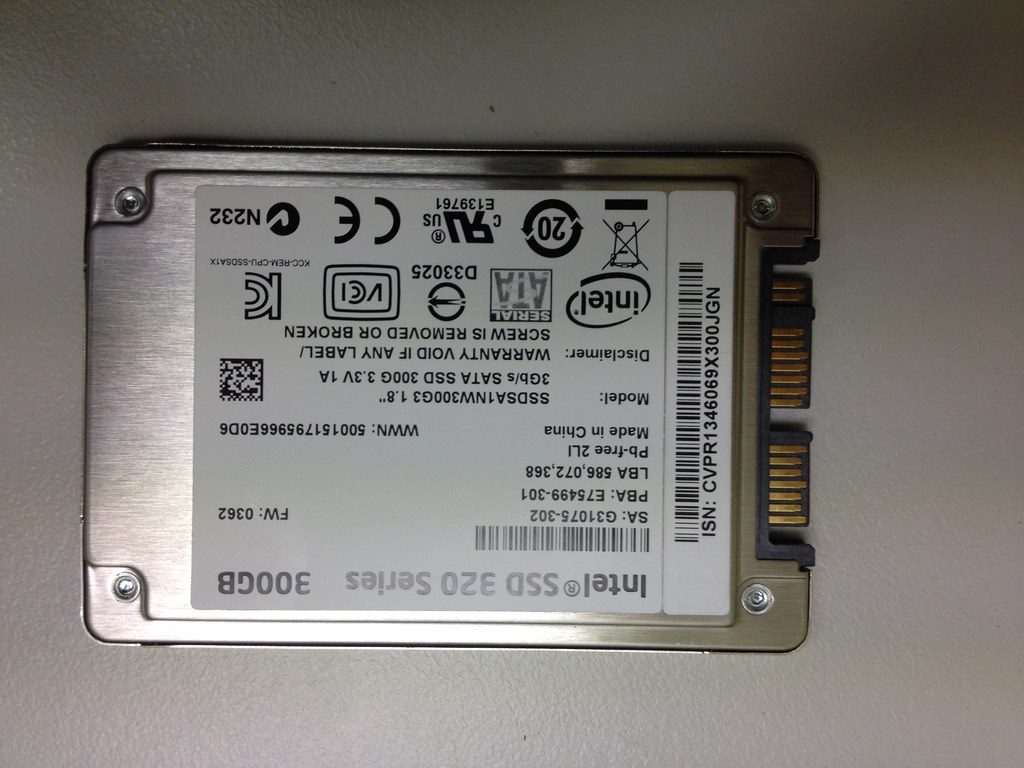
I have successfully upgraded to an Intel 320 Series 300GB 1.8in drive in my e4200. The drive can utilise the lower edge mounting pin and screw hole. It is a perfect fit for the available area so its squeezed into place. This is what everyone wants to see right?


Photo 27-06-12 3 40 59 PM by jketteridge, on Flickr


Photo 27-06-12 3 41 09 PM by jketteridge, on Flickr


Photo 27-06-12 3 41 16 PM by jketteridge, on Flickr


Photo 27-06-12 3 42 39 PM by jketteridge, on Flickr


Photo 27-06-12 3 43 07 PM by jketteridge, on Flickr


Photo 27-06-12 7 12 56 PM by jketteridge, on Flickr


Photo 27-06-12 7 15 06 PM by jketteridge, on Flickr


Photo 27-06-12 7 15 37 PM by jketteridge, on Flickr


Photo 27-06-12 7 18 56 PM by jketteridge, on Flickr


Photo 27-06-12 7 19 06 PM by jketteridge, on Flickr


Photo 27-06-12 7 19 35 PM by jketteridge, on Flickr


Photo 27-06-12 7 19 43 PM by jketteridge, on Flickr


Photo 27-06-12 7 19 47 PM by jketteridge, on Flickr


Photo 27-06-12 7 20 00 PM by jketteridge, on Flickr


Photo 27-06-12 7 20 47 PM by jketteridge, on Flickr


Photo 27-06-12 7 23 15 PM by jketteridge, on Flickr


Photo 27-06-12 7 24 51 PM by jketteridge, on Flickr
 
Thank you so much for the update. I have been looking for an SSD replacement for my E4200 and it looks like a perfect fit!
 
Back
Top